It is scary to see the way we get bombarded by advertsiements on things we had searched, or even spoken loudly about, when we visit a new site on Internet, or click on links of service providers like Google/Microsoft. It feels like being so exposed ! So, I decided it is time to get these IT gaints off my back and take control of my life by myself…
In the year 2026, I have decided to clean up my presence from the broader Internet and not to depend on cloud service providers (like Google, Adobe and Microsoft). Since I am reasonably familiar with technology, it makes sense to try out newer things. I am surprised to see the available open source, free apps that can be self-hosted on a home server, provided you know how to manage them. I am not saying it is easy, but worth the effort. I have spent last 8 months trying out many and have now acquired sufficient confidence to realise ‘I have been taken for a ride by the big tech companies till now. I should have known better. No more !’. Further, I have become more and more aware that these big tech companies have been collecting so much data on me (most of the time without my express permission) and making their profits.
So, big decision: by June 2026, i would have totally moved out of the dependence on Google, Microsoft, Adobe and others who have been charging me exorbitantly high subscription fees. Of course, running a home server is not ‘cheap’, but there is an added advantage of being part of building something new and learning in the process.
Till I find an alternative, I will continue using my Apple account. I use a mac mini, iPad and iPhone now, and cannot cut-off Apple yet. Also, Apple has much better privacy policy and tighter access control.
Last year has been lot of experiments, frustrations, and wins. Finally, I have managed to learn, understand and use some of the services below.
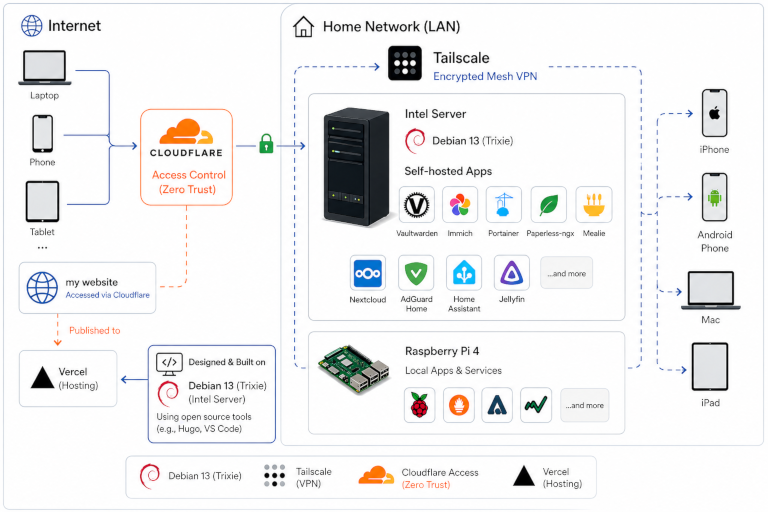
Hardware: Bought a dedicated Intel server machine. HP Pro Tower 280 G9, 16 GB RAM, 1 TB SDD, 13th Gen Intel i7 processor. Registered a domain name (grfamily.online). Took a one year subscription licence from Hostinger to host a VPS (Virtual Private Server) where I did my initial experiments on self-hosting. By June 2026, I will get rid of the VPS and host all my applications of my home servers.
Linux OS: I have a working home server running on linux. First tried Ubuntu distro, and then moved to Debian 13 (trixie), which is more stable.
Raspberry pi This is a small electronic unit which was earlier used by college students and teachers to test out electronic cicuits/projects and simple applications. Now Raspberry pi has matured into a ‘computer’ . Small in size (a large match box size), low power (fit to keep ON 24x7), and affordable cost (less than Rs 10,000). Great for tech nerds for use as small servers. I have two of them, and configured my blog site and few small applications which are to be available all the time. Home server is not on always (as that will consume lot of power and unnecessary)
Tailscale A Tailscale network (known as a tailnet) is a secure, interconnected collection of users, devices, and resources; tailnet is a private space, inaccessible from the public internet. It provides a flexible yet controlled space for device connectivity, resource sharing, and collaboration across the internet. It is a Zero Trust identity-based connectivity platform that replaces legacy VPN. I use it to run secure apps (like password manager) on the home server which are to be accessible only to me on my devices.
Docker containers: Docker uses operating-system-level virtualization to deliver software in packages called containers. Containers are isolated from one another and bundle their own software, libraries and configuration files; they can communicate with each other through well-defined channels. Because all of the containers share the services of a single operating system kernel, they use fewer resources than virtual machines.
dockge A fancy, easy-to-use and reactive self-hosted docker compose.yaml stack-oriented manager. It provides real-time monitoring of Docker container operations, including image pulls and other activities, allowing to track progress instantly through its web interface.
vaultwarden a secure password safe. The unofficial free public vaultwarden instance, to store all my passwords safe and secure, accessible via tailnet from any of my devices. Not available from internet.
Joplin a note-taking app. To capture my daily notes, thoughts, to-do lists and securely access them from any device within my tailnet. Working on mac/ipad/iPhone all sync to the Home server, and latest notes is available on all devices.
paperless-ngx a document management system that transforms my physical documents into a searchable online archive so you can keep less of physical paper.
hugo open-source static site generators. With its amazing speed and flexibility, Hugo makes building websites fun again. I use it to design and publish my blog site.
nginx This is a web server, which i use to publish my website.
mmex Open-source, cross-platform, software that helps me organize our finances and keep track of where, when and to whom the money goes
Portfolio Performance - replaces paid apps like MProfit An open source tool to calculate the overall performance of my investment portfolio (equity and Mutual funds) - across all accounts - using tools such as True-Time Weighted Return or Internal Rate of Return.
mealie easy to use recipe management app. It’s designed to make your life easier by being the best recipes management experience on the web and providing you with an easy to use interface to manage your growing collection of recipes.
zed an open-source code editor for Linux, macOS, and Windows written using the Rust programming language. This replaces Microsoft VS code editor (which is free and open source, but collects lots of user data onto Microsoft servers for use on the backend).
Libre Office (replaces Microsoft office prducts) private, free office suite (replaces Microsoft office) It’s compatible with Microsoft Office/365 files (.doc, .docx, .xls, .xlsx, .ppt, .pptx) and is backed by a non-profit organisation.
stirling-pdf (replace Adobe PDF editors) free, open-source PDF editor. Rich in features, replaces Adobe PDF editor.
filebrowser-quantum (no more cloud storage for my file sharing) free self-hosted web-based file manager with configurable sources, authentication, Office file support, and real-time indexing.
linkwarden self-hosted, open-source collaborative bookmark manager - helps you collect, read, annotate, and fully preserve what matters, all in one place.
karakeep The Bookmark Everything App - Quickly save links, notes, and images and karakeep will automatically tag them for you using AI for faster retrieval. Built for the data hoarders out there!
navidrome - replaces Spotify/Amazon Music/Apple Music Personal Streaming Service for my music collection. to enjoy my music collection from anywhere, by making it available through a modern Web UI and through a wide range of third-party compatible mobile apps, for both iOS and Android devices.
immich - replaces google/Apple Photos. Self-hosted photo and video management solution - replaces Google drive/icloud photo services. Let me to back up, organize, and manage my photos on my home server, without sacrificing my privacy.
Baikal - no more google calendars and Contacts. a lightweight CalDAV+CardDAV server, to manage my address books and calendars. Baïkal allows to seamlessly access your contacts and calendars from every device. It is compatible with iOS, Mac OS X, DAVx5 on Android, Mozilla Thunderbird and every other CalDAV and CardDAV capable application.
Metabase and mySQL Metabase provides a modern. and fastest way to go from database to dashboards. The easy-to-use open source Business Intelligence and Embedded Analytics tool lets me to work on data, with minimum programming. These (along with Libreoffice) free me from Microsoft spreadsheets and powerBI/co-pilot add-ons of Microsoft.
Davinci Resolve - replaces Adobe video editor stack Which is outrageously priced. it is the world’s only solution that combines editing, color correction, visual effects, motion graphics and audio post production all in one software tool! It’s like having your own post production studio in a single app! Best of all, the exact same tools are used by Hollywood professionals! It is FREE. (not open source though). I did buy the studio version few years back, and the licence is perpetual (no annual renewals required, all future new versions automatically available !). Btw, this is resource hungry and runs on my Mac mini (not home server)
Disroot and ProtonMail - I did consider hosting my own email server. While many options are available, mails originating from these self-hosted email servers are likely to be dropped from Internet forwarding service providers who may consider them as spam. So, evaluated Disroot and Proton Mail which are based in Europe (Europe has strong General Data Protection Regulation (GDPR) and data centers there have to be compliant), giving you control over your personal data. Disroot is completely free to use up to 1 GB in the mailbox. Provides E2E email encryption with OpenPGP, but not saved in encrypted form on their servers, so not fool-proof on privacy. Disroot is incredibly impressive with a community-led service that’s sure to please most looking to break away from the clutches of Google, Microsoft, and other corporate titans. The passion behind the project is a refreshing change, but not sure of its long term sustainability mainly on ‘free’ account. ProtonMail is a highly-rated, privacy-focused email service known for strong end-to-end and zero-access encryption, Swiss jurisdiction, and an ad-free experience. Most popular email providers, such as Gmail, Outlook, and Yahoo, scan the content of your emails and use your email address to create a detailed profile on you and profit from your data. Proton Mail’s end-to-end encryption and zero-access encryption ensure only you can see your emails. Not even Proton can view the content of your emails and attachments. The free subscription gives access to one user, 1 GB storage and 1 email address.
Note: The IT giants like Microsoft, google, Apple do not allow integration with these two services (for obvious reasons). Also, many governments do not like encrypted emails to be used (again for obvious reasons). So, we are not ready to fully switch to these or simialr services yet. Till then, we depend on the big guys for our emails !
Final Thoughts
This has been a roller coaster ride, with lot of successes. Hope to achieve the goal of freeing myself from the clutches of IT gaints by mid-2026.
This was a dream come true and gives me great satisfaction.
Learning never stops